




Open the sidebar of any product manager's editor in 2026 and count the agents. Claude Code, Codex, GitHub Copilot, maybe Gemini CLI. All of them can read the repository. None of them knows what the product is, who it's for, or what the team decided last quarter. The coding agents got a seat in the workspace. The product work stayed in a browser tab.
From October 15, Product Map runs in that same sidebar. The plugin brings the full set of product management agents into Cursor, VS Code, and Antigravity, reading the .productmap folder in your repository and writing back to it.
Every agent in the workspace, coding or product, starts from one product context.
This tutorial is a release note with a practical bias. It covers what the plugin does, which agent to open for which job, how context changes get reviewed, and how to install it in each editor.
PM agents in the same sidebar as your coding agents
The extension is one install per editor. It adds a Product Map icon to the activity bar and a chat panel in the sidebar, where you pick a project and talk to an agent. The same panel opens as an editor tab, splits, or moves to a second window, and sessions survive a reload.
Three editors are supported at launch:
- Cursor: the same extension, same sign-in, same projects as VS Code.
- VS Code: version 1.100 or later.
- Antigravity: Google's agent-first editor, with sign-in routed back to the Antigravity window instead of VS Code.
The plugin works next to Claude Code, Codex, Gemini CLI, and GitHub Copilot in the same workspace. The split is simple. Coding agents write code. Product Map agents write strategy, specs, priorities, research plans, and go-to-market, grounded in your product context. Both sides read the same repository, so a PRD drafted in the Product Map panel is on disk for Claude Code to build against a minute later.
Product knowledge lives as plain Markdown in .productmap/, structured by the TASK framework: topics, agents, skills, and knowledge. That folder is the shared source of truth. It's the setup described in the Cursor guide, with the product agents now living inside the editor instead of in a separate browser tab.
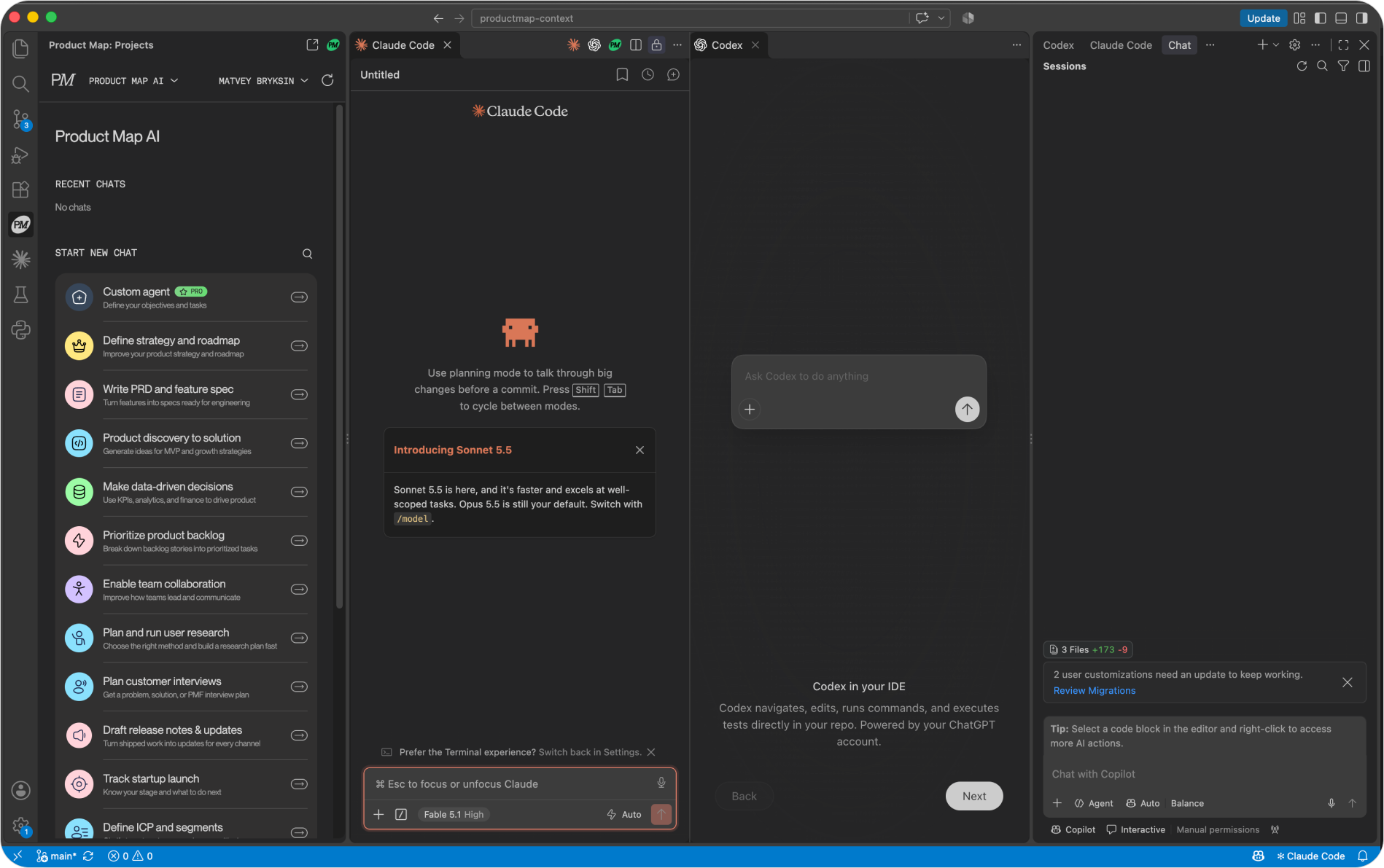
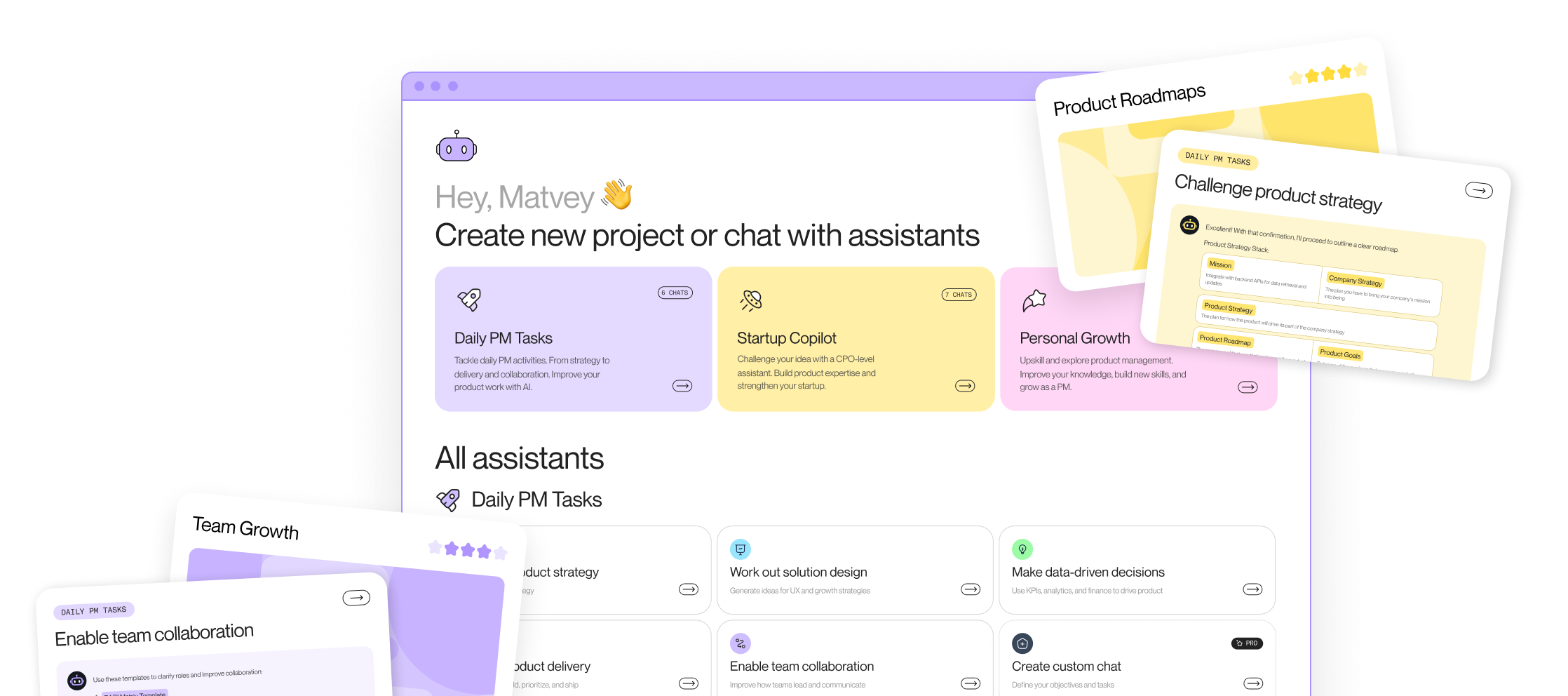
Which agent to open for which product management job
The plugin ships every agent from the Product Map catalog. There are 26 of them in three groups. Pick by the job in front of you, not by the agent name.
Daily PM tasks
Fourteen agents for the work a product manager does every week.
- Strategy and planning: Define strategy and roadmap, and prioritize product backlog. Open these when the roadmap needs a decision, not a list.
- Specs and delivery: Write PRDs and feature specs that turn a feature idea into a spec engineers can build from, and Draft release notes and updates that turn shipped work into channel-specific updates.
- Discovery and research: Product discovery to solution, Plan and run user research, and Plan customer interviews. The interview agent builds problem, solution, or PMF interview plans.
- Data and decisions: Make data-driven decisions using KPIs, analytics, and finance to argue for or against a move.
- Market and growth: Run competitor analysis, Run market research, Build product growth strategy, and Create digital marketing ideas.
- Team: Enable team collaboration, leadership, and communication.
- Custom AI agent: your own objectives and instructions, on the PRO plan.
Startup PM copilot
Nine agents for a founder or first PM who has to cover the whole company.
- Idea and vision: Validate the startup idea by arguing against it before arguing for it, and track the startup launch by naming your stage and the next step.
- Customer and positioning: Define ICP and segments, and build a unique value proposition.
- Scope and money: Scope and challenge MVP, Define monetization strategy, and Calculate unit economics, which models LTV, CAC, and contribution margin.
- Launch and funding: Build a go-to-market strategy and prepare an early-stage pitch, turning notes into a script for an investor deck.
Personal growth
Three agents for the PM, not the product: Career advice and coaching, CV and interview preparation, and exploring product management for people planning a move into the role.
How to run AI agents
Agents chain. A real week in the plugin looks like this: run market research on Monday, feed the result into Define ICP and segments, hand the segment to Write PRD and feature spec, and finish with Draft release notes. Each run reads what the previous one wrote into .productmap/, so nothing gets re-pasted. The agents guide goes deeper on how to brief each one.
One agent per task is the point. A general chat model given your product one-pager produces a plausible document. A task agent given the same context produces the document in the shape your team reviews, scored against the framework your team uses.
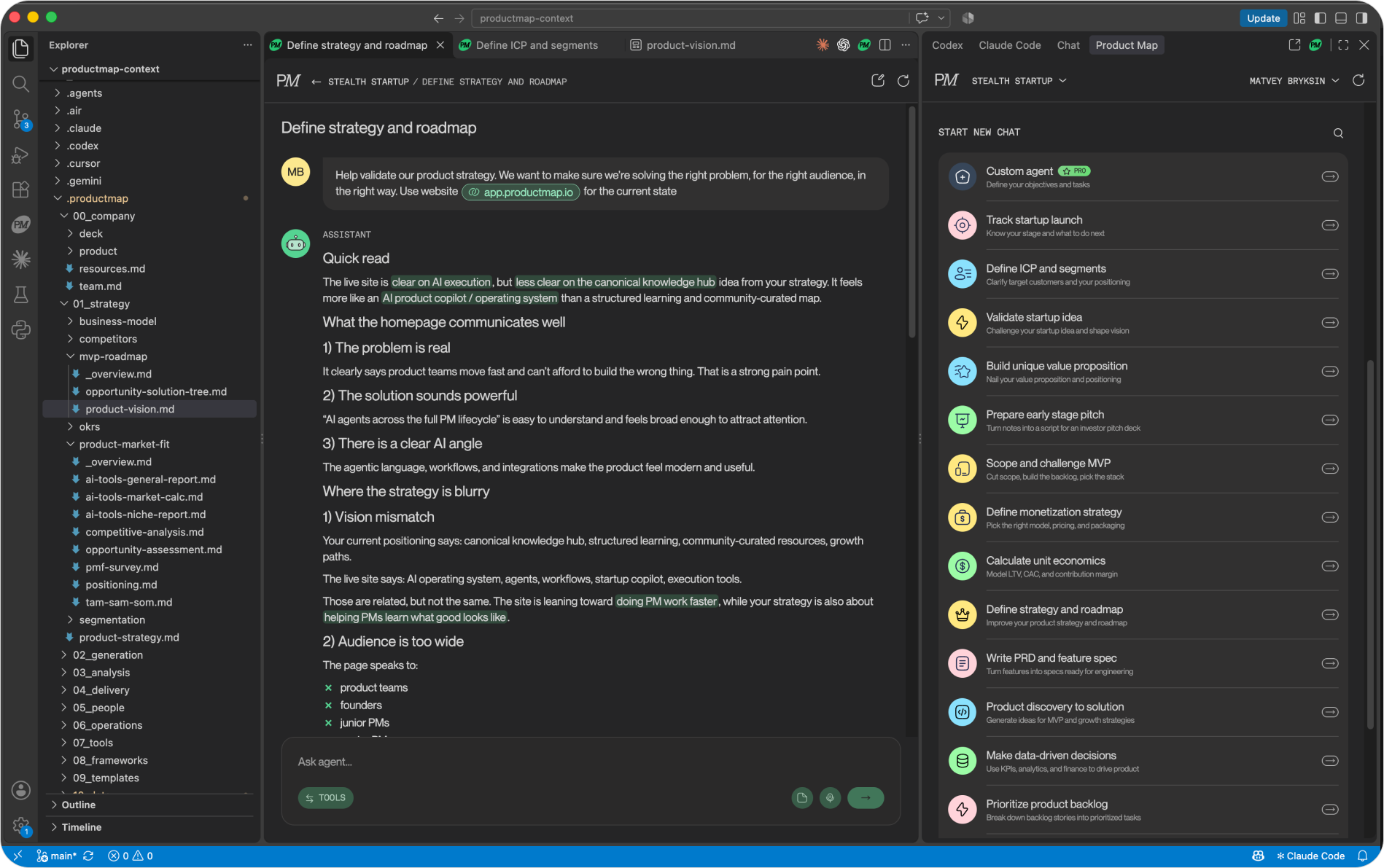
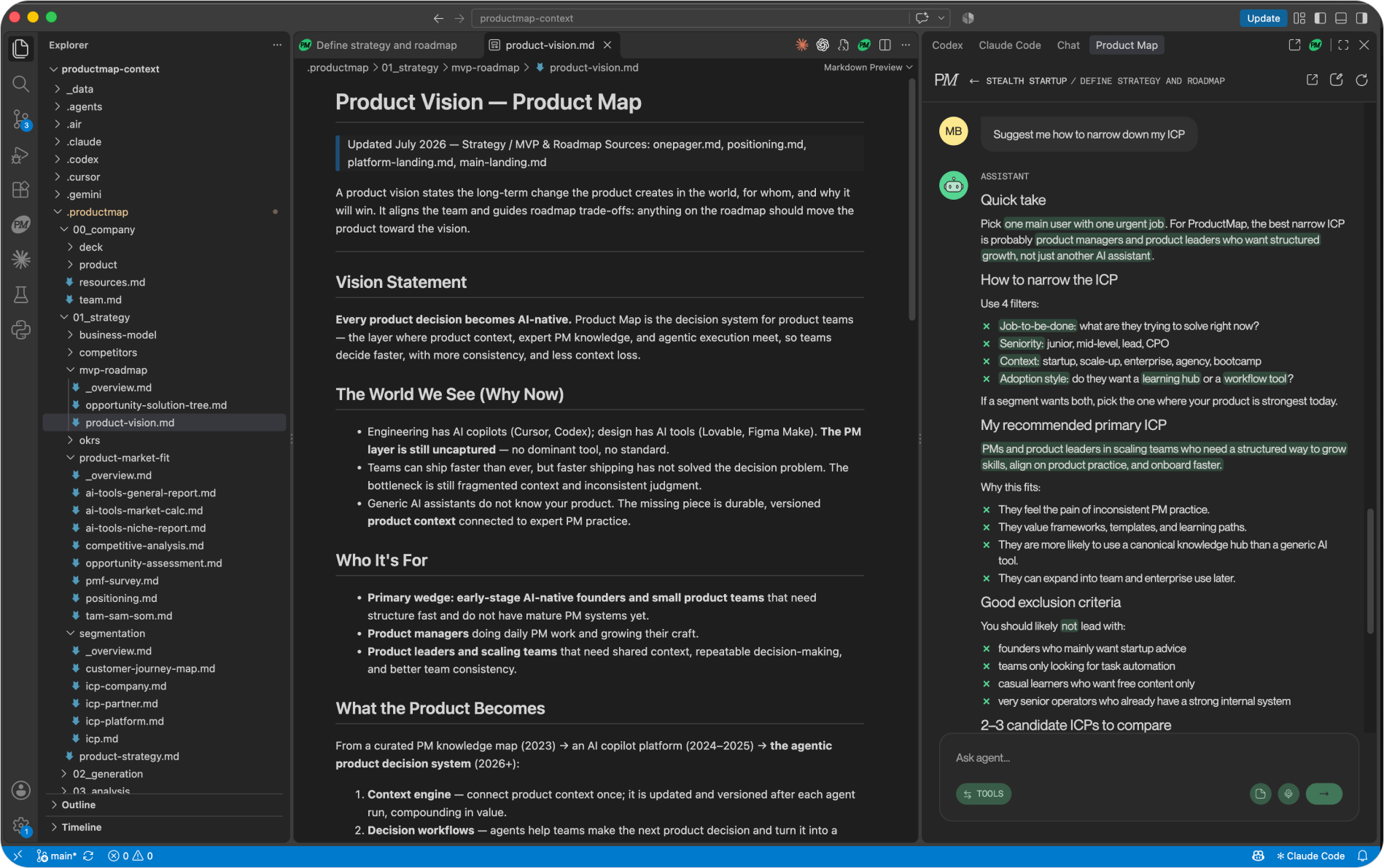
Each chat opens as an editor tab, so two agents run side by side with the file they're working from. In the screenshot below, Define strategy and roadmap and Define ICP and segments sit in tabs next to product-vision.md, the .productmap tree is open in the Explorer, and the message mentions the live site with @ so the agent reads the current positioning before it answers.
Review every change as a diff
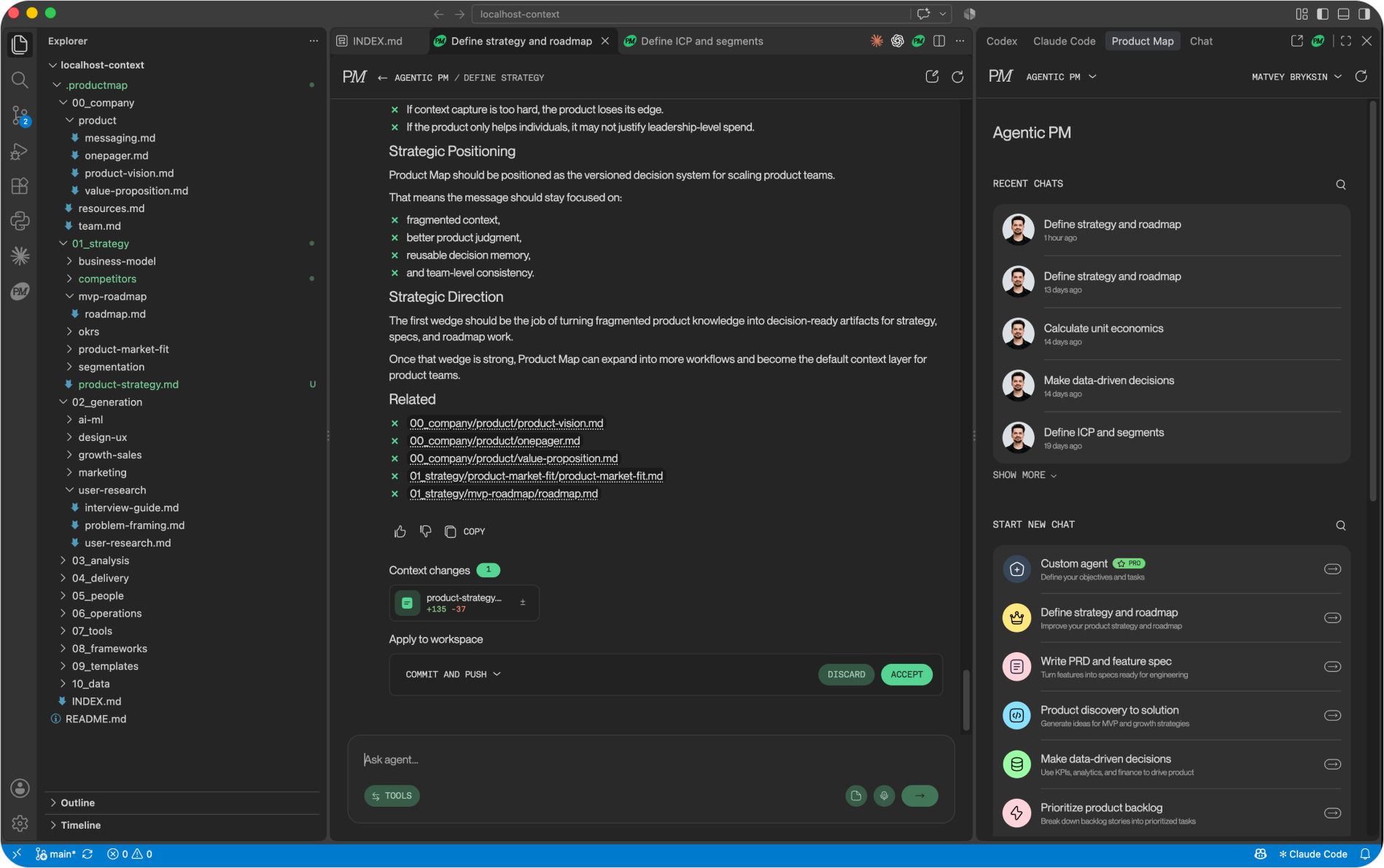
Each agent can change product knowledge, and each change goes through a review step. When an agent proposes an update to a file in .productmap/, the extension writes it into your local checkout and shows it as a context change card. You open the diff in the editor, edit it if the agent got a line wrong, then accept or discard. Nothing is overwritten without a click.
Accept has two modes, and the card tells you which one applies.
- With a local checkout: choose Commit and push, or Commit alone and push later with the rest of your branch.
- Without a local checkout: choose Push to your base branch, or Open pull request, both through the Git connection on your Product Map project.
Discard puts the files back exactly as they were. If you edited a file after the agent applied it, Accept commits your version, not the agent's.
This is the same review flow engineering runs on code, applied to the product one-pager, the strategy doc, and the PRD. History is git log. Blame is git blame. A team sharing one context repo gets a reviewer's name on every change to the product record, which no wiki offers.
Keep the product context current with every agent run
Agents read context before each run and propose edits after it. That loop is what keeps the .productmap folder from going stale the way a Confluence space does.
Before drafting, an agent loads the files relevant to its task: the one-pager, the strategy, the ICP, the research that exists. Type @ in the composer to attach specific files from .productmap/ or a web page to a message, so the agent works from the exact sources you point at instead of guessing. The answer ends with a Related list naming the files it read, so you can open any of them in the next tab and check. After drafting, the agent proposes what changed: a new PRD under delivery, an updated segment under strategy, a research plan under generation. You review, accept, and the next agent reads the updated version.
The artifacts are ordinary files in the editor. Open product-vision.md in Markdown preview on the left, ask the agent on the right how to narrow the ICP, and both of you are looking at the same text. There is no export step and no copy into a wiki, because the wiki is the folder.
Markdown on disk is also the cheapest format for an agent to read. The token benchmark measured the same product overview at 649 tokens as Markdown and 12,715 tokens as JSON, and a Notion page fetched live through its API cost around 6,200 tokens in tool calls before the agent saw a word. A file in the repo costs the text alone, for Product Map agents and for Claude Code alike.
Install it in three steps
The steps are the same in each editor.
- Install the plugin in the workspace that holds your product context repository. The install links on the plugin page open Cursor, VS Code, or Antigravity directly, or search for Product Map in the Extensions panel.
- Sign in with a Product Map account. Run Product Map: Sign In from the command palette, or press
Cmd+Alt+Mon Mac andCtrl+Alt+Mon Windows and Linux to open the panel. The browser opens the login page and returns you to the editor. The first time, set up the project knowledge base at app.productmap.io and connect it to Git. - Run an agent, review the diff, and accept it into the repository.
The plugin is free. A free account connects one project and one Git repository. Projects, team invites, and Git connections are managed in the web app, and the editor picks them up on sign-in.
Context stays in your repo. The plugin sends only your messages and the files you attach to Product Map, which matters for a security review if the repository is private.
The question nobody answers: who owns the context folder
Two kinds of agent now write to the same repository, and the question a head of product has to settle before the team installs anything is who owns .productmap/.
The default answer is nobody, and it fails within a month. Claude Code reads the PRD to build a feature, notices the spec names a field the code doesn't have, and helpfully edits the spec to match the code. A week later, the PM runs Prioritize product backlog against a spec the engineering agent rewrote. The product record now describes what got built instead of what was decided, and nobody saw the change because it landed in the same commit as 400 lines of TypeScript.
Three rules fix it, and all three are plain Git.
- Product owns the folder. Add a
CODEOWNERSentry for.productmap/naming the product manager. Any pull request touching it needs a product reviewer, whichever agent opened it. - Coding agents read, PM agents write. Say so in
CLAUDE.mdandAGENTS.md: treat.productmap/as read-only context, and raise a mismatch between spec and code as a comment, never as an edit. The Git skill set article covers the context-file conventions. - Protect the branch. Branch protection on main means a context change from the plugin arrives as a commit on a branch or a pull request, not a silent push. The Open pull request option exists for this.
The second question is drift between the repository and the places people still write. The spec starts in a Google Doc, gets pulled into the repo once, and the doc keeps changing. The repository copy is the one agents read, so it has to be the copy the team keeps current. Make the doc an input and the repo the record, and run the review gate every time the input changes.
Open the sidebar
The browser tab was never the problem. The problem was an agent reading a one-pager pasted into a chat and forgetting it on close. In the editor, the one-pager is a file. The agent reads it, proposes a change, and the change has a diff, a reviewer, and a commit hash.
Install the plugin in whichever editor already has Claude Code or Codex in it, point it at the repository, and run one agent against real context. The first diff it opens tells you more about the product record than the last six months of wiki edits.