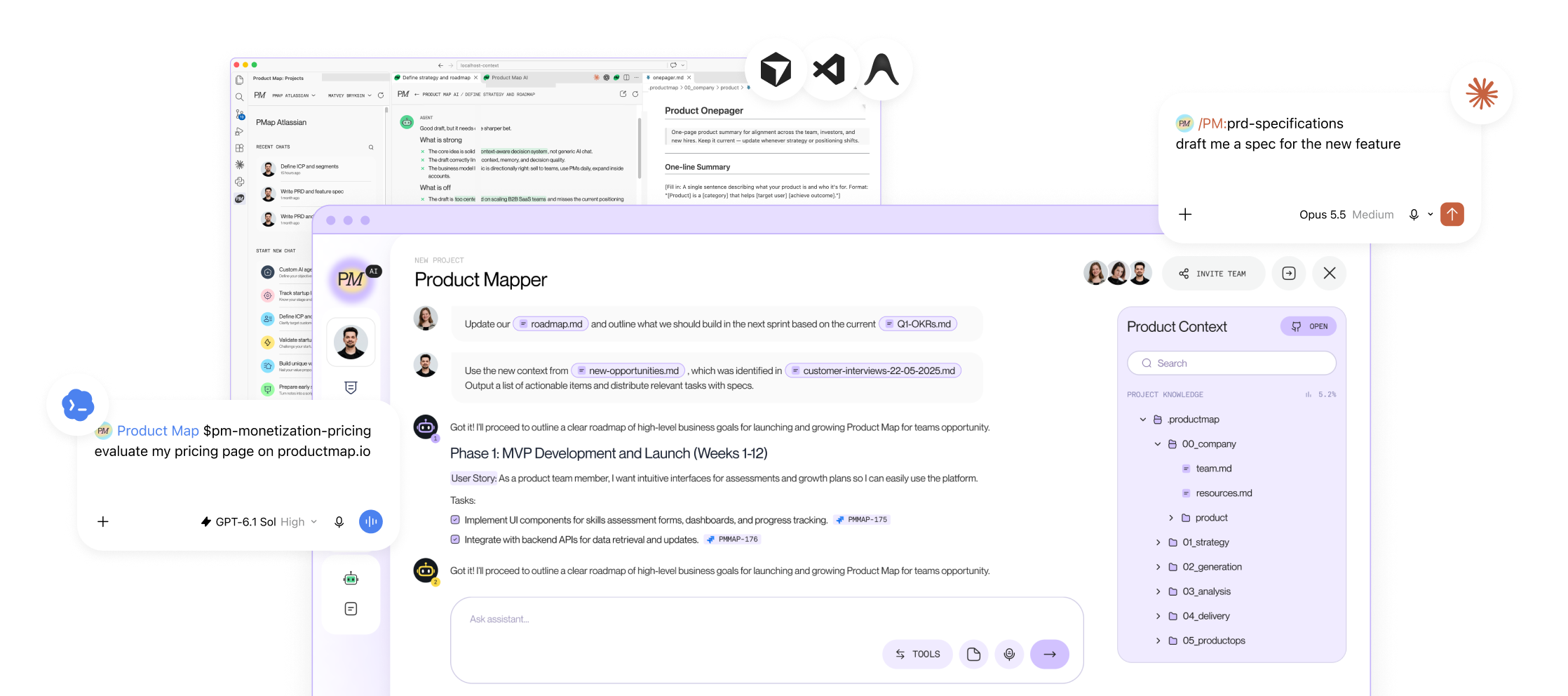


The most useful comment under Pawel Huryn's PM Skills Marketplace launch is a question the post never answers: how do I change one of these? The marketplace ships 68 skills and 42 commands. Dean Peters' repository ships 77. Anthropic's product-management plugin ships 7. Each one encodes a stranger's definition of a good PRD, a good interview guide, or a good roadmap. Installing is covered. The Git and repos guide walks through npx skills add and symlinks.
Writing is the gap. This tutorial fills it with the file structure Product Map runs in its own skills folder, more than 30 skills deep, plus the two patterns a single-task skill never shows you: pipelines and sub-agents.
Copy the template, fill it for one task you repeat weekly, and the quality bar is yours instead of rented.
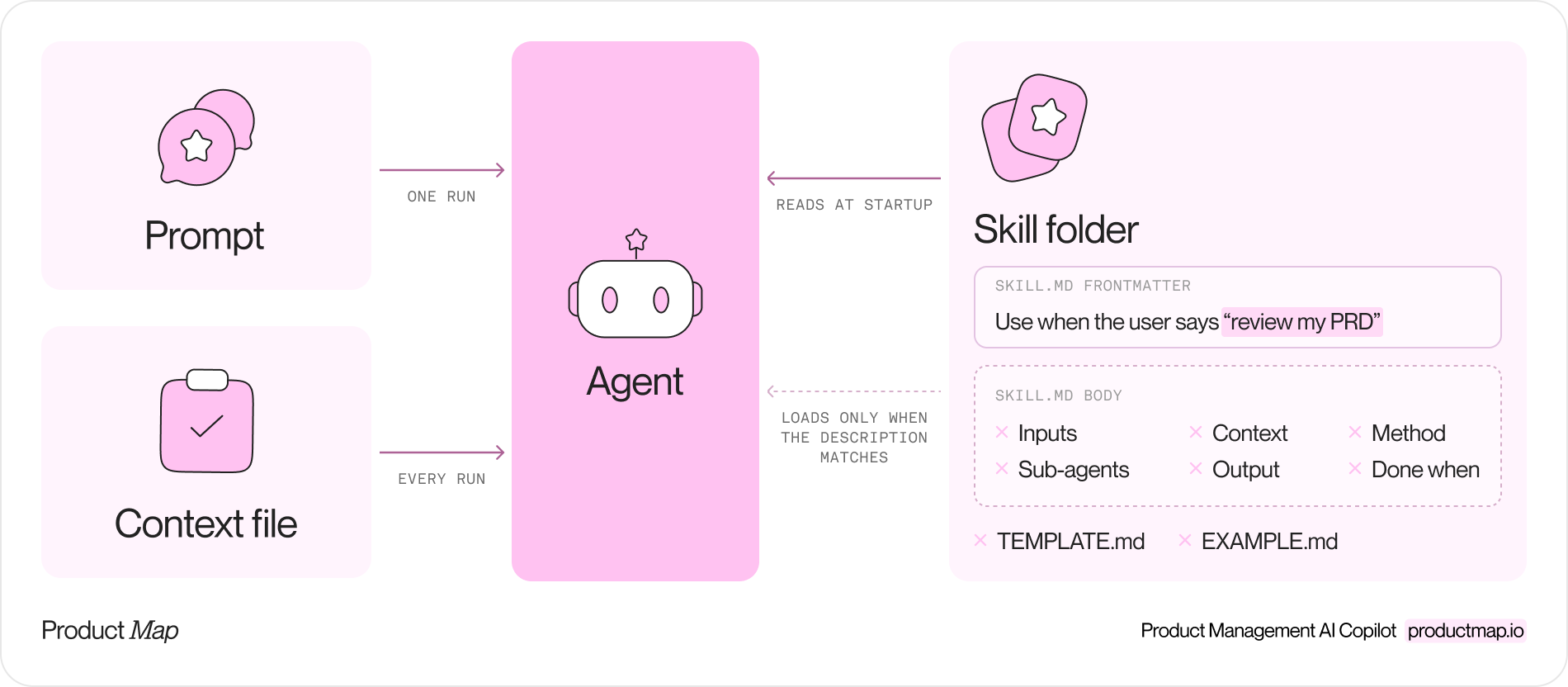
A skill is a method, not a prompt or a context file
Three kinds of file look alike in a repository and do different jobs. A prompt is one instruction for one run; the prompts article has a page of them. A context file, CLAUDE.md or AGENTS.md, tells every agent what the product is and how to behave in the repo. A skill is a folder the agent loads only when the task matches. Inside is a method: inputs, files to read, ordered steps, an output shape, and a check for done.
Anthropic's Agent Skills spec sets the minimum. A folder named after the skill, a SKILL.md inside, YAML frontmatter at the top, instructions below. Claude Code reads the frontmatter of every installed skill at startup and loads the body only when it decides to use one. The description is the only part the agent sees before choosing. Write it as a trigger, not a summary.
The product-on-purpose pm-skills repository, at v2.34.0 on 17 October 2026, enforces a three-file contract in CI: SKILL.md holds the method, TEMPLATE.md the output shape, and EXAMPLE.md a filled example. An agent with a template and an example produces a document your team recognizes. An agent with a method alone produces a plausible one.
The frontmatter fields worth getting right for PM work:
- Name: the folder name, lowercase with hyphens. It becomes the slash command.
- Description: the trigger. Write the phrases a PM types, such as "review my PRD" or "is this ready for engineering," and name the cases it must refuse.
- Argument-hint: what follows the slash command, so you and the agent agree on inputs before the run.
- Allowed-tools: the ceiling. A review skill reads; it never writes files or runs scripts. Snyk's April 2026 review of PM skill packs found skills committing to Git inside autonomous loops and skills shipping Python. This field is where you say no.
- User-invocable and disable-model-invocation: whether a person can call it and whether the agent may pick it on its own. Anything with external side effects, a Notion write or an email, stays human-only.
Copy the SKILL.md template
The template below is a review skill for PRDs, because a review is the fastest skill to test: you already know what a good and a bad PRD look like. Every section is required. The paths point at the .productmap/ tree the product-management-context repository on GitHub ships, so the file runs as written in a fork of it.
---
name: prd-review
description: Review a PRD draft against the team PRD template and quality bar. Use when the user says "review my PRD", "is this spec ready for engineering", or pastes a PRD. Not for writing a PRD from scratch (use /prd-requirements).
user-invocable: true
argument-hint: "<path to the PRD file> [strict]"
allowed-tools: Read, Grep, Glob, Agent
---

# PRD review

## Inputs
- A PRD file path, or pasted PRD text. Treat the first line as the title.
- Optional `strict` flag: fail the review on any story without acceptance criteria.
- If nothing is provided, ask for the file path. Never review a PRD you have not read.

## Context to read first
- `.productmap/09_templates/prd-template.md` for the required sections.
- `.productmap/00_company/product/onepager.md` for scope and target users.
- `.productmap/04_delivery/backlog-requirements/_overview.md` for acceptance criteria rules.
Cite these files in findings. Do not restate their content here.

## Method
1. Map every heading in the PRD to a section of the template. List what is missing.
2. For each user story, check INVEST and acceptance criteria in Given/When/Then form.
3. Flag every metric without a baseline, a target, and a measurement source.
4. Flag any scope statement excluding nothing.
5. Write findings into the output template, severity first.

## Sub-agents
- For a PRD over 2,000 lines, spawn one read-only sub-agent per 2,000-line range.
- Brief each with: the file range, the template path, the output schema, a budget of 10 file reads, and the instruction to return findings only.
- Merge and dedupe before scoring. Never delegate the verdict.

## Output
Use `TEMPLATE.md` in this folder. One finding per line: severity, section, what is missing, the fix.
`EXAMPLE.md` shows a review of a shipped PRD; match its depth.

## Done when
- Every template section has a status: present, partial, or missing.
- No finding lacks a suggested fix.
- The verdict is one of: ready for engineering, needs one more pass, not a PRD yet.
If a check fails, revise the review. Do not edit the PRD.
Two sections carry most of the value and get skipped most often. The Inputs section states what the PM brings and what the skill does with nothing. Borrowed skills assume a brief exists and invent one when it does not; a line saying "ask for the path" closes the hole. The Done when section is the checker. Agents stop when the work looks finished unless you say what finished means. Write it before the Method. If you cannot name the check, the skill is not ready.
The Context section cites files by path and refuses to restate them. When the PRD template changes, every skill pointing at it changes with it. The context engineering guide covers how to lay out the tree the paths point into.
Turn a PRD review checklist into a skill in one hour
Your team already has a checklist. It lives in a Confluence page and gets applied to one PRD in three. An hour turns it into the file above.
- Ten minutes, Method. Paste the checklist in. Rewrite each item as a check with a visible outcome. "Clear scope" becomes "the scope section names at least one excluded use case."
- Ten minutes, Context. Find the template and overview files each item assumes and point at them by path. Delete every sentence in the skill restating what those files already say.
- Fifteen minutes, TEMPLATE.md and EXAMPLE.md. Decide the finding format. Then run the half-finished skill on your last shipped PRD, keep the output, and mark two findings as the bar: this depth, this tone.
- Ten minutes, Done when and frontmatter. Write the three checks. Write the description using the words your PMs type. Set allowed-tools to read-only.
- Fifteen minutes, the test. Run it on a PRD you know is weak and compare with the checklist applied by hand. If the agent did not pick the skill up, the description is wrong, not the method. Commit on a branch and open a pull request so a teammate reviews the skill the way they review code.
A skill is ready when a teammate can read the file and predict what the agent will do with a PRD they have never seen.
Pipeline skills: one command runs several skills in order
One skill does one job. The weekly work of a PM is a sequence of jobs, and a pipeline skill is the file holding the sequence. Our growth team's partnerships pipeline runs four stages: pull the existing records from Notion into a CSV, search for new companies, prepare the approved rows, and push them back. Stage two is one line: follow the instructions in the companies-search skill. The pipeline owns order, checkpoints, and hand-offs. It never owns a method.
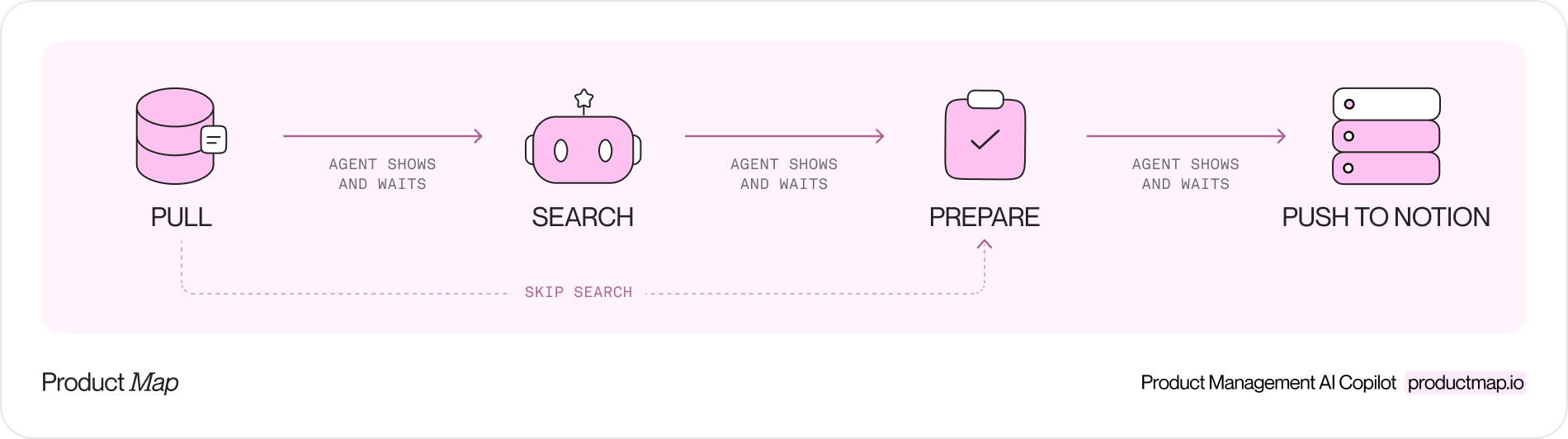
Four rules keep a pipeline skill from turning into a 400-line prompt:
- Each stage is its own skill with its own Done when. The pipeline references it by path and adds nothing.
- Hand-offs are files on disk. The CSV from stage one is the exclusion list for stage two. What the agent remembers from a previous stage is not a hand-off.
- A checkpoint follows every stage. The agent pauses, shows what it produced, and waits. Side effects, the Notion write or the email, live in the last stage behind the last checkpoint.
- A skip-to argument such as
skip-to:stage-3re-enters after a failure without re-running the search you already paid for.
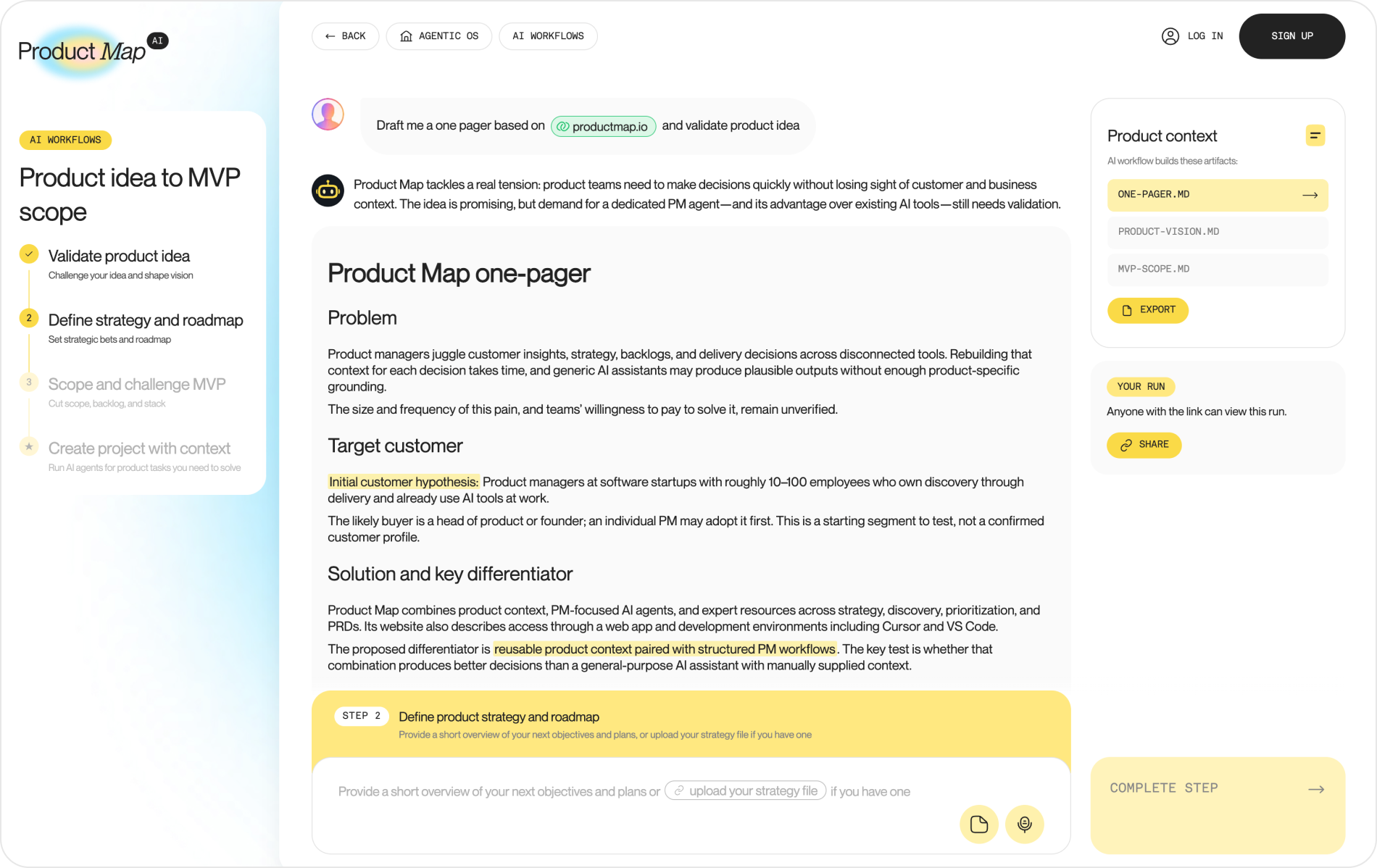
The same shape runs on Product Map without a repository. The workflow catalog chains three scoped agents: the first writes a Markdown file, the second reads it as its only source of truth, and the third challenges both. In product idea to MVP scope, step one challenges the idea and writes one-pager.md, step two drafts product-vision.md from it, and step three cuts mvp-scope.md against both. You read each file before the next step runs. A pipeline skill in your repo and a workflow on the platform are the same design: scoped steps, file hand-offs, a human gate between them. The AI workflow guide covers the five chains in the catalog.
Sub-agents in a skill: brief them like contractors
A sub-agent is a fresh agent your skill spawns with its own context window. It knows only what the brief says, and you see only what it returns. Both hand-offs lose detail.
Spawn one when the work is independent and read-heavy: five channels to search at once, or a 6,000-line PRD to review in ranges. Keep judgment, verdicts, and writes to shared files in the parent.
Our creator pipeline skill spawns five sub-agents in one go, one per content platform. Each brief carries six items: the topic focus, the assigned platform with up to three queries, the exclusion list from stage one, the output schema, a budget of three web searches and two page fetches, and a stop condition of six qualified results. One compact topic line replaces the full taxonomy in each brief, which cuts the token bill by about three times. Results return as structured rows. The parent dedupes them and moves to the checkpoint.
Write the sub-agent section of your skill as the brief itself:
- Goal and what is ruled out, so the sub-agent does not re-derive decisions the parent made.
- Files to read, by path. Point, do not paste.
- Output schema, one row per finding, so merging is mechanical.
- Budget and stop condition. Reads, searches, fetches, and the count at which to return early.
- The never list. No writes to shared files, no external sends, no final verdict.
Treat what comes back as data, not instruction. A sub-agent's confident summary of a page it half-read looks identical to a correct one, so the parent re-reads anything that becomes a claim in the output. The product-on-purpose repository runs a pm-skill-auditor sub-agent against its own skills before each release, which is the other good use of the pattern: a reviewer with no memory of writing the draft.

Build the same skill as a custom agent on Product Map
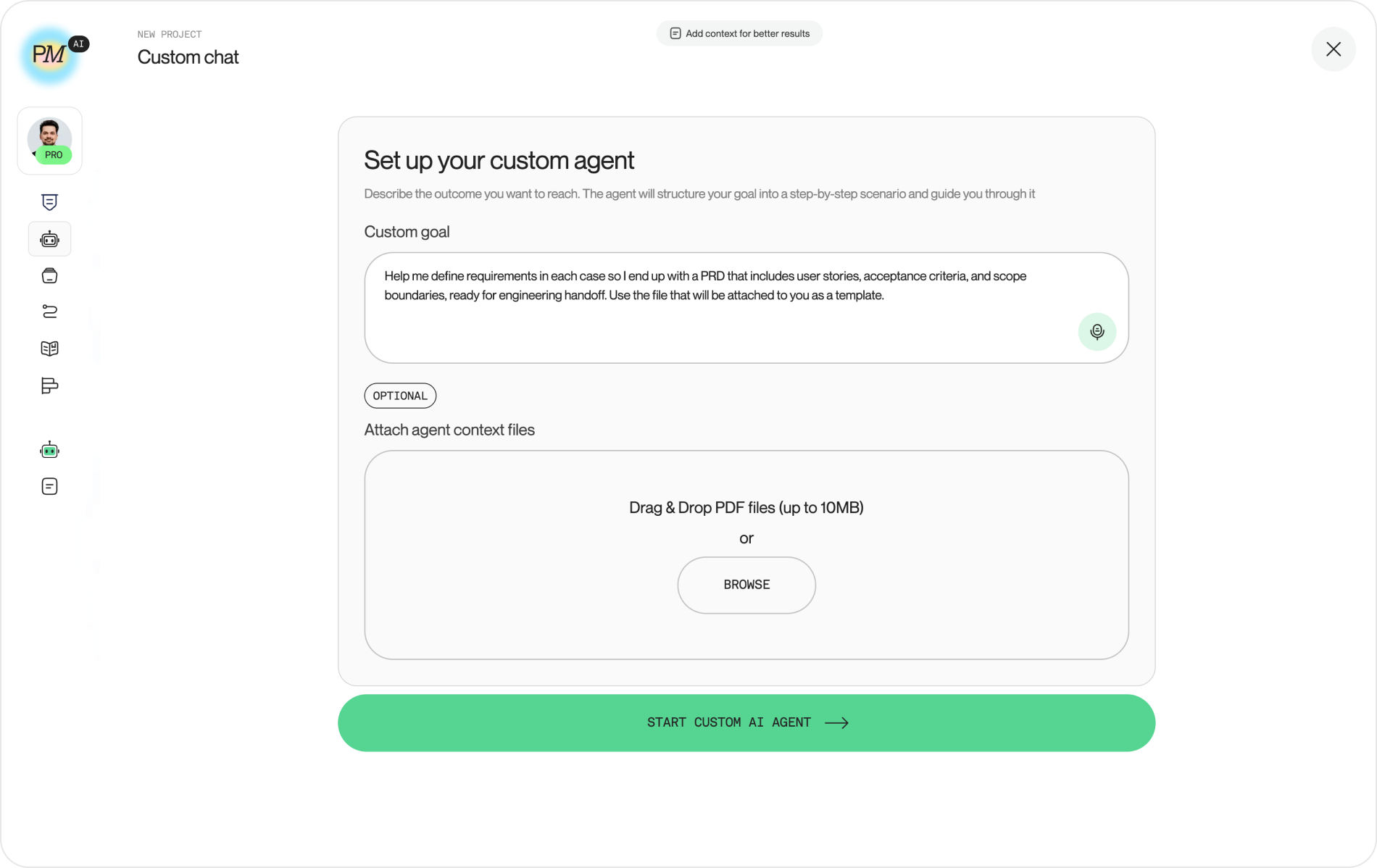
Not every PM wants a repository. On Product Map the same five parts run as a custom agent built from a goal. The goals page offers seven starting goals: MVP or product launch, tools and workflows, stakeholder collaboration, discovery and research, metrics and product impact, prioritization and roadmaps, and team facilitation. Or you create a personalized goal and the agents build the plan around it.
Inside a project, the custom agent setup asks for one paragraph: describe the outcome you want to reach. You can attach up to 10 MB of PDF context files. The agent structures the goal into a step-by-step scenario and guides you through it, advancing a step when its objective is met.
The mapping to the file is direct:
- Description becomes the goal statement.
- Context to read first becomes the attached files plus the project's knowledge base.
- Method becomes the generated scenario steps.
- Done when becomes the step completion the orchestrator checks before moving on.
You give up version control, pull request review, and control over sub-agents and budgets. You get a working agent in two minutes, next to catalog agents already trained on the PRD template and the rest of the tree. Custom goal-based agents are a paid feature; the catalog and the workflows run on the free plan.
When to fork a public skill, and how to keep it current
Fork when a public skill's method matches yours and only the template differs; a RICE scoring skill or a retro format rarely needs rewriting. Write your own when the skill encodes a definition your team argues about: what a PRD contains, what done means, what passes review. Whoever owns that definition in your company should own the file. A skill pack moves the ownership to a GitHub account with 7,600 stars, and the move is invisible because the output looks fine.
A fork is a dependency, so run it like one:
- Install at project level and pin the version. A skill updated upstream changes agent behavior on your machine on the next run.
- Keep a one-line changelog per skill in the folder. Date, what changed, who approved.
- Re-run EXAMPLE.md after every update. If the output of the same input changed, read the diff before you keep it.
- Review skill updates as pull requests, the same way you review a library bump.
The product-management-context repository on GitHub is a working starting point: 11 Claude Code skills under .claude/skills/, 20 Codex skills, 10 Gemini skills, and the .productmap/ tree they all point into. Fork it, replace one skill with the template above filled for your team, and run it on Monday. The folder stops being a download and starts being yours.
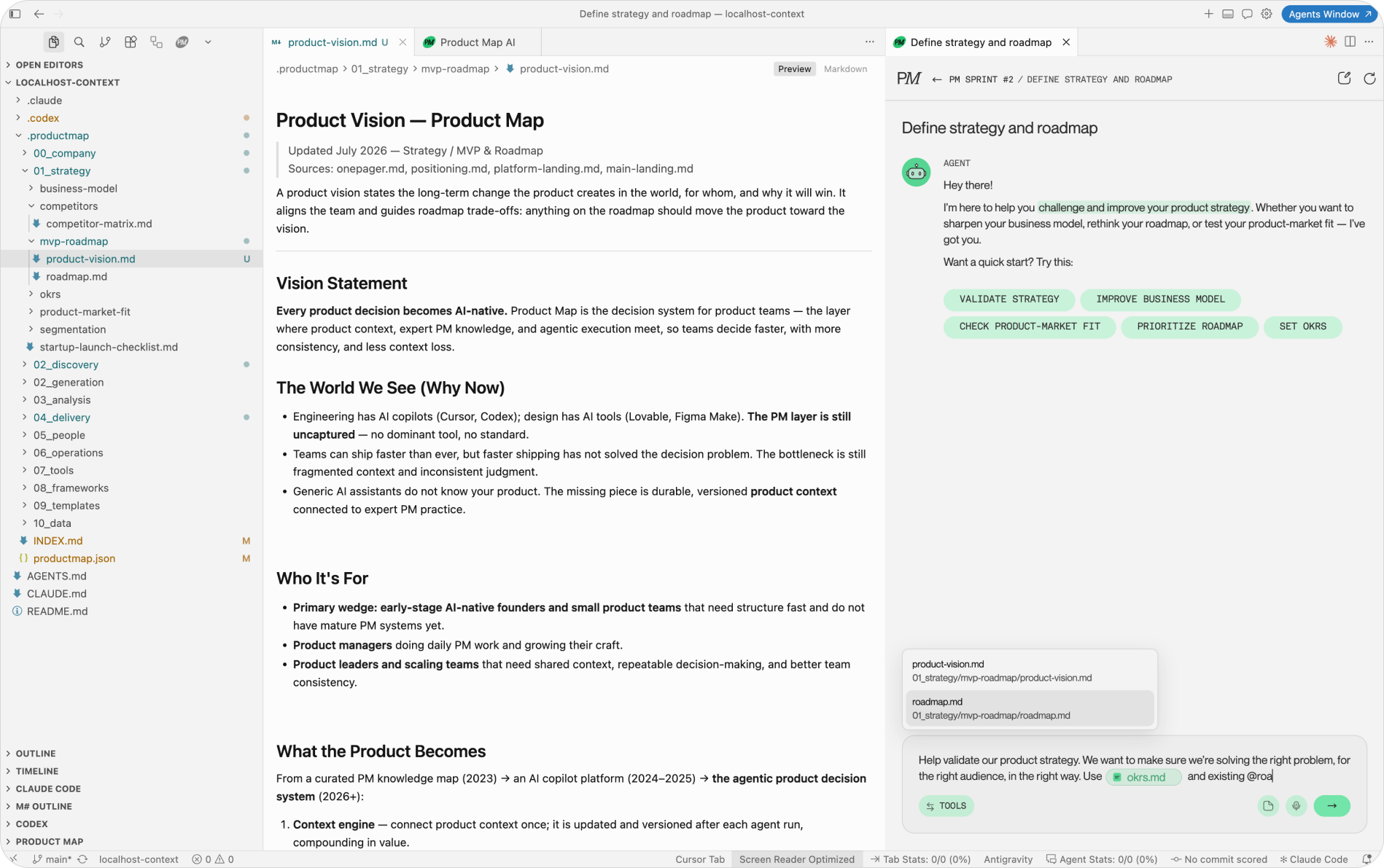
Work in Cursor, VS Code, or Antigravity instead of a terminal? The Product Map plugin puts the PM agents in the same sidebar as Claude Code and Codex, pointed at the same .productmap/ folder your skills read. Write the skill in the editor, run it, and review each change as a diff.
FAQ: writing your own PM skill
What is a SKILL.md file?
It's the instruction file inside a skill folder. YAML frontmatter at the top holds the name and the trigger description. The body holds the method: inputs, files to read, ordered steps, output shape, and a check for done. The agent reads the frontmatter of every installed skill at startup and loads the body only when the task matches.
How is a skill different from a prompt or CLAUDE.md?
A prompt is one instruction for one run. CLAUDE.md or AGENTS.md tells every agent what the product is and how to behave in the repository. A skill is a method the agent loads only when the description matches the task, with a template and an example for the output.
Which agents can run a SKILL.md?
Claude Code reads skills from .claude/skills/, and Codex and Gemini CLI have their own skills folders. The product-management-context repository ships 11 Claude Code skills, 20 Codex skills, and 10 Gemini skills pointing into one .productmap/ tree. The method in the file stays the same across runners.
What should the description field say?
Write it as a trigger. Include the phrases a PM types, such as "review my PRD" or "is this spec ready for engineering," and name the cases the skill must refuse. The description is the only part the agent sees before it decides to load the skill.
Do I need TEMPLATE.md and EXAMPLE.md?
For PM work, yes. The template fixes the shape of the output, and the example shows the depth and tone you expect. An agent with both produces a document your team recognizes. An agent with the method alone produces a plausible one.
How long does it take to write the first skill?
About an hour if your team already has a checklist. Rewrite each item as a check with a visible outcome, point the Context section at your template files, run the draft on your last shipped PRD, and write the three Done when checks.
When should a skill use sub-agents?
When the work is independent and read-heavy, such as searching five channels at once or reviewing a 6,000-line PRD in ranges. Brief each sub-agent with the goal, the files to read, the output schema, a budget, and a never list. Keep the verdict and any writes in the parent.
Should I fork a public skill or write my own?
Fork when the method matches yours and only the template differs. Write your own when the skill encodes a definition your team argues about, such as what a PRD contains or what passes review. Pin the version of any fork and review updates as pull requests.
Can I build the same skill without a repository?
Yes. On Product Map you describe the outcome in a custom agent, attach up to 10 MB of PDF context, and the agent builds a step-by-step scenario from it. You give up version control and control over sub-agents. Custom goal-based agents are a paid feature.