




A workflow is a decision you made once so you don't have to make it again. Product managers remake the same decisions every week: which of the 300 new tickets matter, what the competitor shipped, whether this spec is ready to hand over. AI changed the economics of writing those decisions down, because a written decision can now run itself.
That's what an AI workflow for product managers is: a repeatable sequence with a trigger, a model step, and a place the output lands, built once and run every day without you.
This guide covers the four maturity levels, five lifecycle workflows worth building first, the builders for each level, and the guardrails that keep an automated decision from becoming an automated mistake.
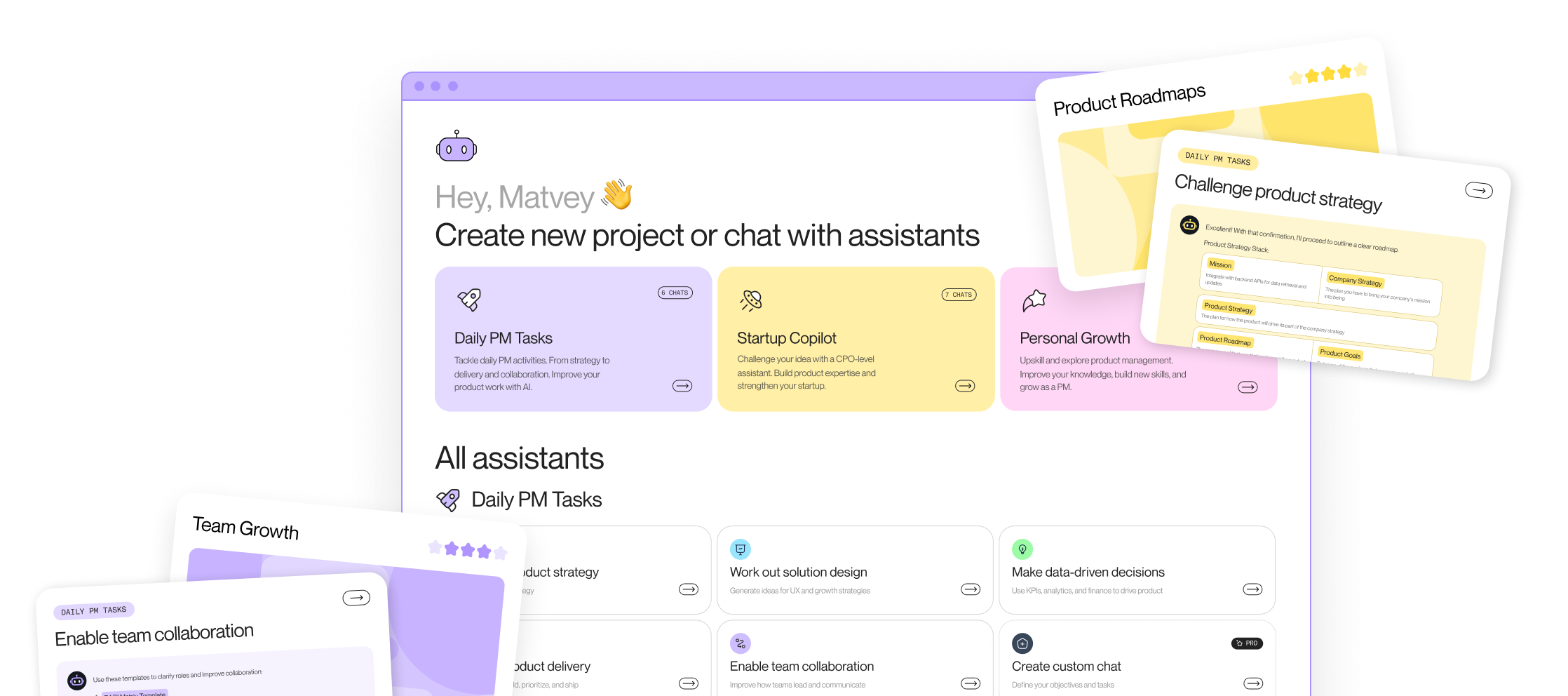
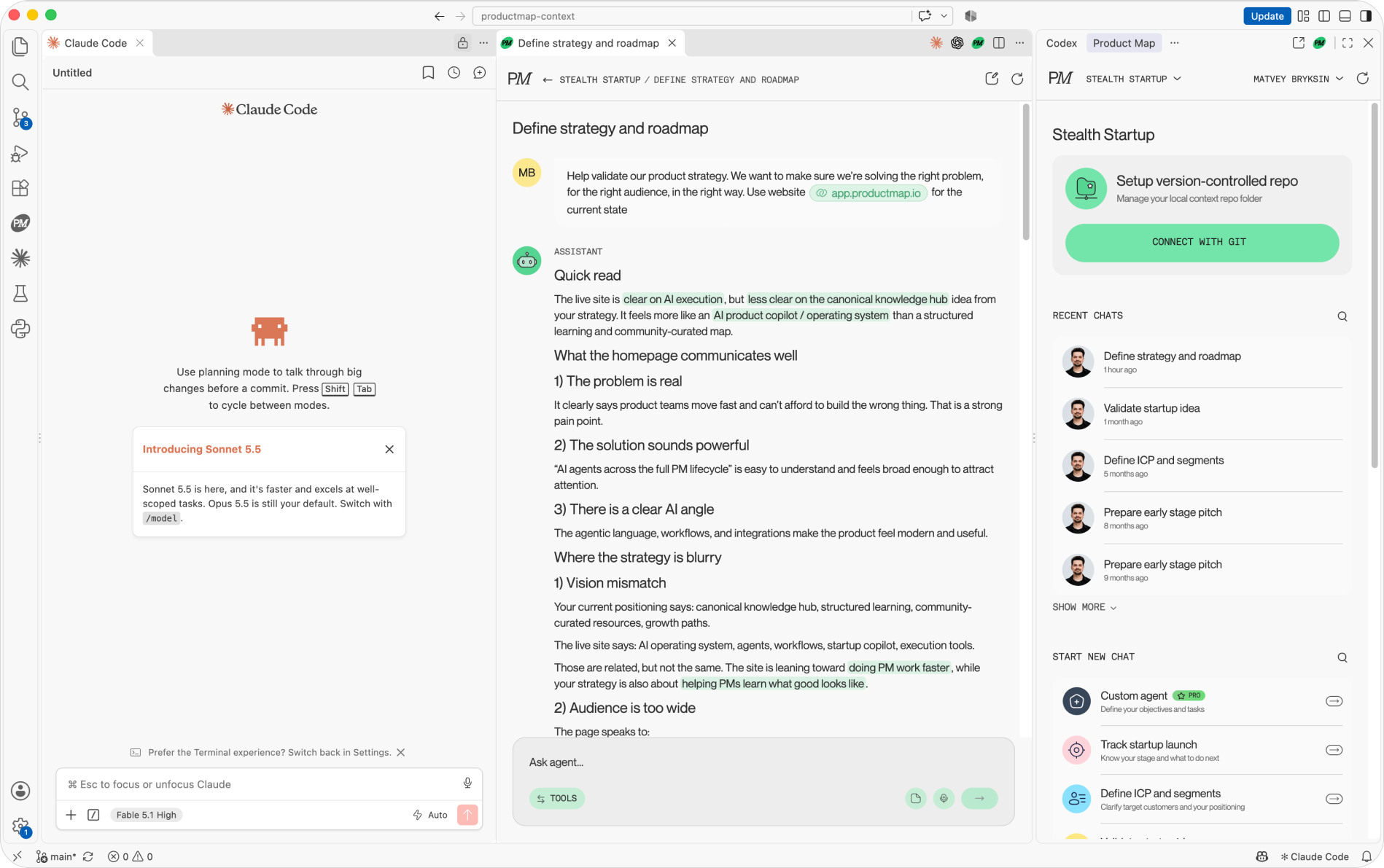
None of this has to live in one tool. A single VS Code workspace can run Claude Code, Codex, GitHub Copilot, and Product Map AI side by side: a coding agent edits the product context files, a Product Map agent drafts the strategy from them, and every chat stays attached to the same project.
What counts as a PM workflow
Every workflow has five parts: a trigger (a new ticket, Monday 9 a.m., a merged pull request), an input, a transformation, an output, and an owner. Product teams already run dozens by hand: feedback triage, competitor tracking, spec drafting, backlog scoring. Each one is a PM reading, deciding, and writing, on a schedule.
AI automation changes the middle step. The trigger and the destination stay in Zendesk, Slack, Jira, or a Git repository. The reading and the first draft move to a model. The PM keeps the last step: review, edit, send. So the useful question is never "which AI tool" but "which weekly decision could I write down once."
.png)
From manual to AI-enhanced product management workflows
Four levels, in the order teams reach them.
Level 1: prompt-based help
You open a model, paste the tickets, and ask for themes. It works and it doesn't scale, because the context lives in your clipboard and the prompt in your memory. The step up is saving both so the next run starts where the last one ended; the prompt library for product managers covers that anatomy.
Level 2: no-code automation
A trigger fires, a model step runs a saved prompt, and the output lands somewhere. New Intercom conversation, classify it, post the tag and a one-line summary to Slack. Zapier, Make, and n8n do this in an afternoon. The limit is context: the model sees the ticket and nothing about your product, so its classification is generic.
Level 3: grounded retrieval
The model reads your product context before it acts: the one-pager, the ICP, the strategy, the metric definitions, stored as Markdown files in a product context repository. The same classification workflow now knows what "enterprise" means for your company. Outputs stop needing a rewrite here, and context size starts costing tokens if the files sprawl.
Level 4: agentic workflows
An agent gets an objective and tools instead of a fixed sequence. "Every Monday, review last week's tickets, update the top-ten problem list in research/feedback-themes.md, and open a pull request." It decides which steps to run and waits for a human to merge. A lighter form is a chain: several agents run in sequence, each reads the file the previous one wrote, and a person approves between steps. The PM's job shifts from doing the workflow to managing the agent running it: reading the diff, catching drift, adjusting the objective.
.png)
The gap between manual and level-three work shows up in four places:
- Discovery: a research sprint per quarter becomes a weekly synthesis of every ticket and transcript, quotes traced to sources.
- Prioritization: a scoring meeting that runs out of attention by item forty becomes a first-pass RICE score on every item, with the PM arguing the ones that look wrong.
- Documentation: a PRD from a blank page becomes a section-by-section draft from the decision log.
- Delivery: grooming in the meeting becomes a cleaned backlog before it.
Five AI workflows to build across the product lifecycle
Discovery with generative AI
Trigger: a new interview transcript lands in the research folder. The model extracts jobs, pains, and quotes against your interview guide and appends them to a running synthesis file. Two rules keep it honest: no quote absent from the transcript, and no invented persona. Continuous discovery with AI only works when every claim traces to a real conversation.
Customer feedback synthesis
Trigger: daily, at 7 a.m. The model classifies yesterday's tickets by product area and problem, updates the counts, and posts the three fastest-growing problems to the product channel with ticket IDs. Build this one first: the tickets are already the most candid research you own, and nobody is reading them.
Competitive intel monitoring
Trigger: a change on a competitor's pricing page, changelog, or careers page, caught by a page monitor. The model summarizes it against your positioning file and flags whether it touches a roadmap item. Nine alerts in ten are noise; the one showing a competitor hiring for the feature you're scoping pays for the setup.
PRD and feature spec drafting
Trigger: a decision log reaches "scoped." The model drafts the PRD section by section from the log and your template, lists undecided points under open questions, and opens a pull request. The AI PRD template adds the eval, cost, and failure-mode sections when the feature has a model in it.
Prototyping from the spec
Trigger: the PRD is merged. A prompt-to-app tool builds a clickable version of the main flow from the user stories, and the PM puts it in front of five users before an engineer reads the spec. Some teams now ship the prototype instead of the spec for that reason.
AI workflow builders for product managers, by level
No-code automation platforms
Zapier has the most connectors and the least setup. Make handles branching and loops better. n8n is self-hostable, which matters when tickets contain customer data that can't leave the building. All three have native steps for OpenAI, Anthropic, and Google models.
Context workspaces and agents
Claude Projects and ChatGPT Projects hold a set of files and a standing instruction, which is level three for one PM. For a team, the context has to be shared and versioned. Product Map's agents read a connected Git repository of product context and run scoped PM jobs against it: ICP definition, PRD drafting, backlog scoring, unit economics. Claude Code and Cursor do the same for PMs comfortable in a terminal.
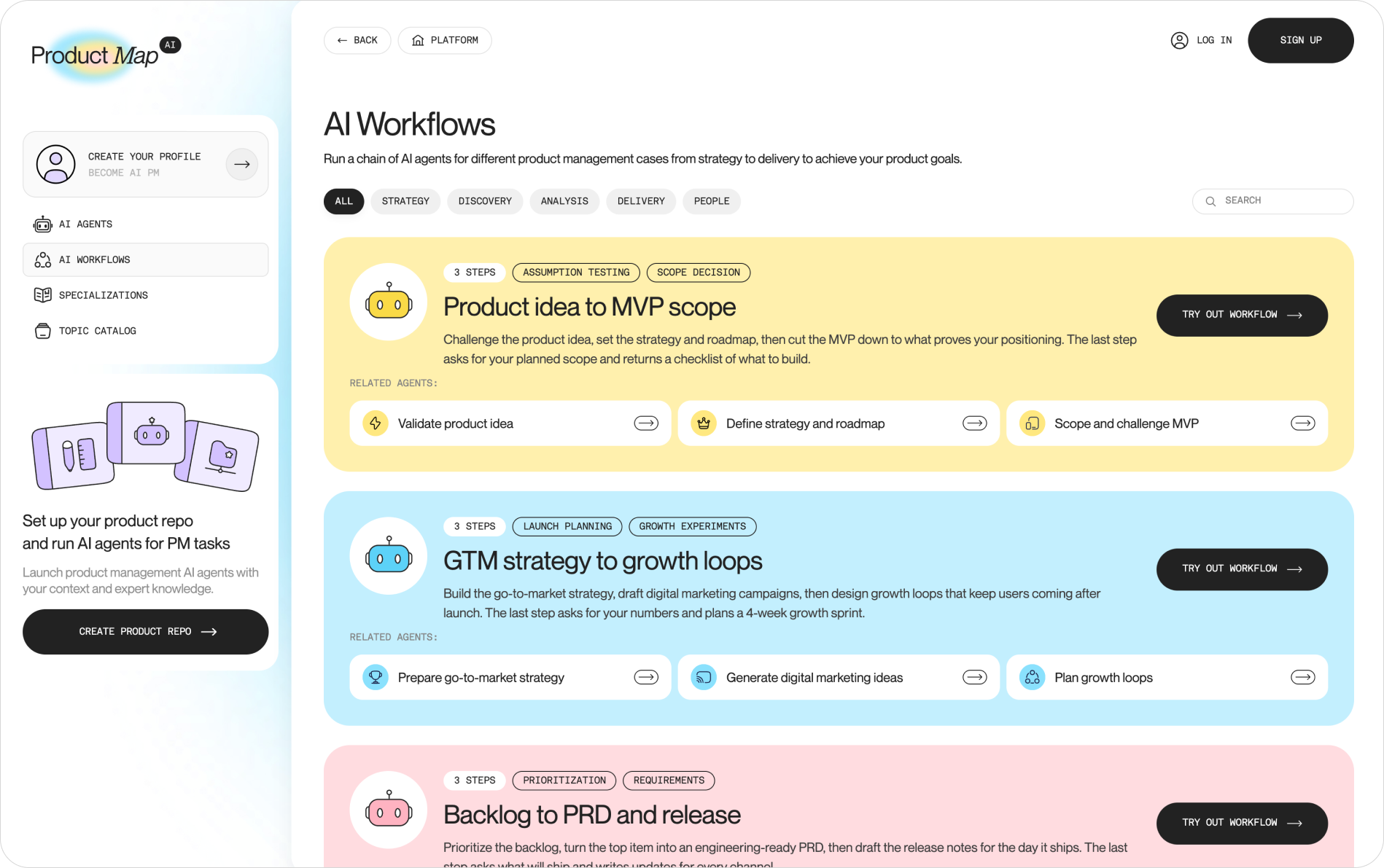
For the jobs too big for one agent, Product Map now runs chains of agents as workflows. Each workflow is three scoped agents in sequence: the first writes a Markdown file, the second reads it as its source of truth, and the third challenges both. The catalog covers five lifecycle jobs: product idea to MVP scope, market research to positioning, user research to opportunities, backlog to PRD and release, and GTM strategy to growth loops.
No-code prototype builders
Lovable, v0, Bolt, and Figma Make turn a spec into a working interface without an engineer. Replit adds a backend when the prototype stores data.
Build your first AI workflow
- Pick the weekly task with the most reading in it. Ticket triage and the status update are the usual winners. Skip anything outbound to customers.
- Write the decision down as a prompt. Context, task, output format, constraints, quality bar. If you can't write the quality bar, you don't know the decision well enough to automate it.
- Run it by hand for two weeks. Same prompt, real inputs, and a scorecard: accepted as is, edited, or rejected. Below 70% accepted, fix the prompt or the context before adding a trigger.
- Add the trigger and the destination. A schedule or an event on one end, a Slack channel, a file, or a pull request on the other. Output goes where a human reads it, never straight to a customer.
- Name the owner and the review. One person owns the prompt file. The scorecard runs monthly. A workflow nobody owns is accurate the day it ships and decays from there.
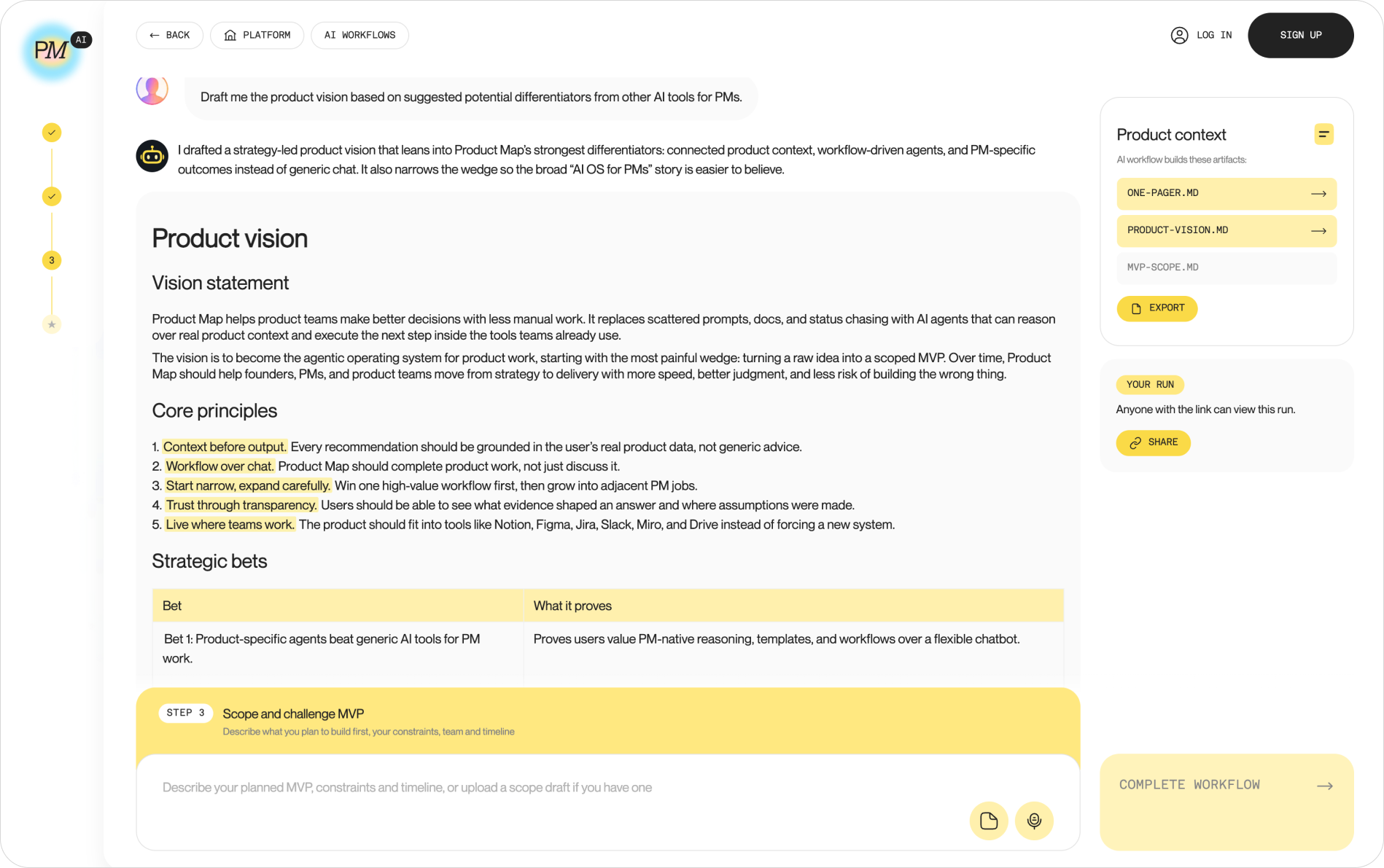
If you'd rather start from a working chain than a blank prompt, run one from the workflow catalog first and copy its shape. The product idea to MVP scope workflow takes a link to your landing page and runs three agents. The first challenges the idea and writes one-pager.md. The second drafts product-vision.md with strategic bets and a now/next/later roadmap, using the one-pager as its only source of truth. The third cuts the MVP against both files and writes mvp-scope.md: the single claim the MVP must prove and a checklist of five initiatives, each tied to the hypothesis it tests.
You read each file before the next step runs, which is the human gate from step four built in. The artifact panel on the right shows which files the chain has produced so far and which one is still to come. The whole chain runs as a guest session; you sign up only to save the files into a project.
Workflows outside the catalog go through Product Map's custom agent builder, a PRO feature: objective, tasks, and the context repository in one screen, running next to the built-in agents.
Guardrails that keep an AI workflow reliable in production
- A human gate on anything outbound. Drafts to customers, ticket status changes, and roadmap edits stop at a review step. Internal summaries can flow.
- Source tracing on every claim. Themes carry ticket IDs. Competitor summaries carry URLs. An output with no traceable source is invented.
- A twenty-case test set. Real inputs with accepted outputs. Rerun it when the prompt changes and when the model provider ships an update, which changes behavior without anyone editing a line.
- A pinned model version and a change log. So a quality drop can be traced to a change.
- Data handling decided before the first run. Business-tier API access with training opt-out, names stripped from tickets, self-hosting when security requires it.
Two risks sit outside the checklist, and heads of product rarely see them until they've paid for them. The first is a workflow so good nobody reads a ticket anymore, and six months later no one on the team has heard a customer's own words. Keep one raw-reading hour a week per PM, and don't automate it. The second is ownership decay. Workflows are built by the person who cared and inherited by the person who didn't, and the inherited prompt keeps running on assumptions from two roadmaps ago. Put the owner's name in the prompt file and review every workflow at handover.
Where AI workflows go next
- One context, many agents. The Markdown product context repository becomes the shared memory every agent reads, whichever vendor runs it.
- Connectors between PM tools. Model Context Protocol servers for Jira, Linear, Amplitude, and Notion let an agent read a ticket and a chart in the same run, without a middleware platform.
- Agent ops as a role. Someone reads the diffs, watches the scorecards, and retires drifted workflows. On large teams it's becoming a title.
FAQ
Can an AI workflow replace a product manager on a team?
No. It replaces the reading and the first draft. The decision, the tradeoff, and the accountability stay with a person; the replacement question has a longer answer elsewhere. What the workflow removes is the excuse for not having read the tickets.
How much technical skill do PMs need to build AI workflows?
None for levels one and two; the builders are visual. Level three needs comfort with a Git repository and Markdown files, a week's learning. An engineer helps at level four, unless you start from a chain in the workflow catalog or take the custom-agent route above.
How long does it take for an AI workflow to pay off?
Two weeks of manual runs and an afternoon to wire the trigger. Daily ticket triage then returns three to five hours a week for a PM who was reading tickets, and zero for one who wasn't.
Build your own AI workflows or wait for your tools?
Build the ones that read your product context, because no vendor's AI button knows your ICP or strategy. Wait on pure tool plumbing, like ticket deduplication inside Jira, which the vendor will ship better than you can.
How do you measure the hours an AI workflow saves?
Time the task by hand for two weeks before automating it. After, count review time plus fixes. The difference is the saving, and the scorecard's accepted rate keeps it honest. Report both.
Write the decision down once
Pick the decision you remake most often, write it as a prompt with a quality bar, and run it by hand for two weeks. If the scorecard holds, wire the trigger. When it doesn't, the two weeks taught you what you didn't know about the decision, which is worth more than the automation. The TASK framework describes the end state: topics for the domain, agents for execution, skills for judgment, and knowledge as versioned files the agents read. Every workflow you build is one more decision moved into that system and out of your Monday.