




Type "write a PRD for a notifications feature" into any model and you get the same 900-word document every other product manager got this morning. Clean headings. Plausible user stories. Nothing your engineers can build, because the prompt was told nothing.
A working prompt for product management carries three parts the generic one lacks: the context of your product, the exact task with its output shape, and the bar the output has to clear. A reusable prompt pointed at the same context every run turns one PM's judgment into a workflow the whole team runs.
The playbook on how to use AI as a product manager covers where AI fits at each stage. This guide covers the prompts: the anatomy, eleven prompts across the lifecycle, one-line adjustments by specialization, and the tools to version them.
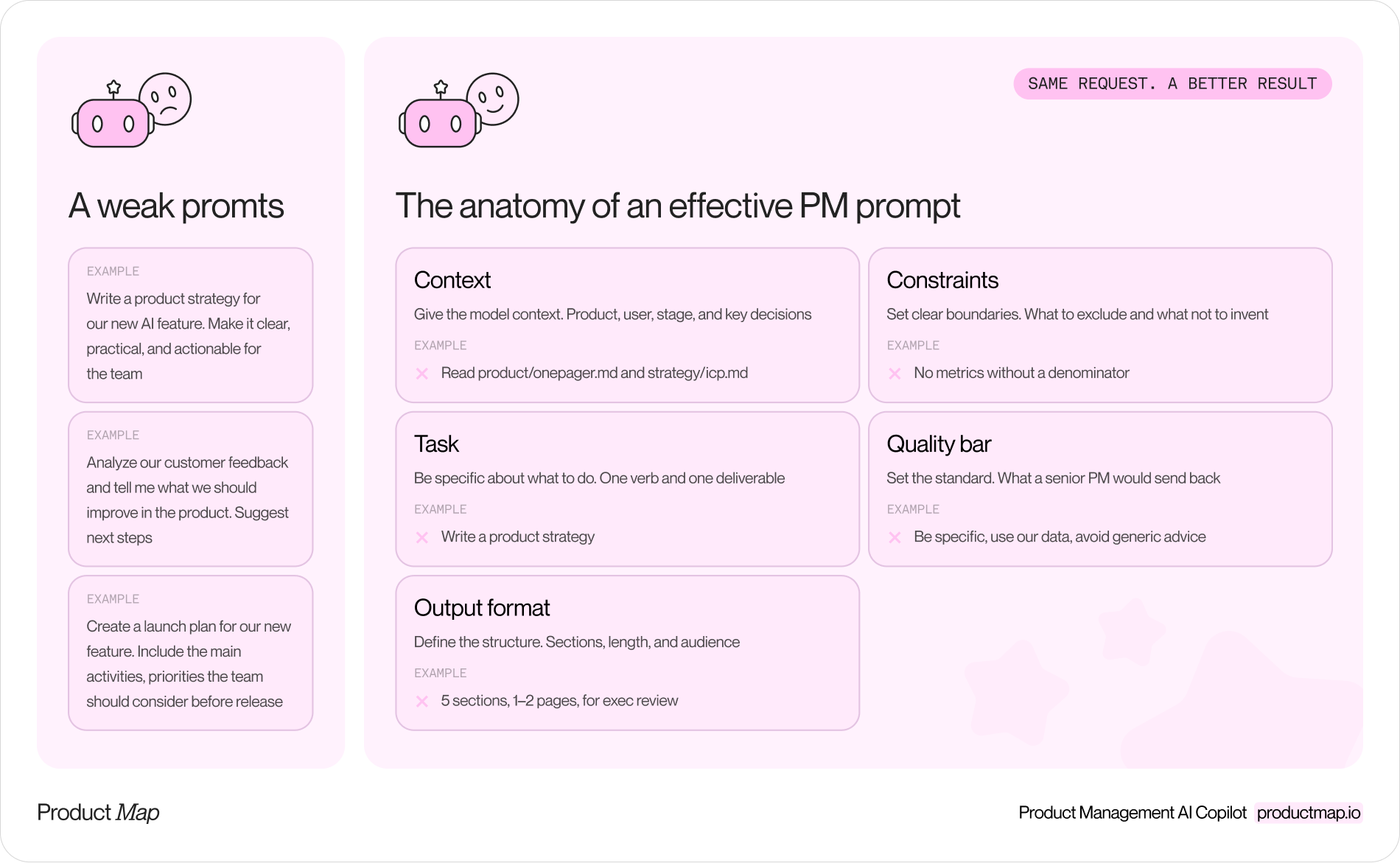
The anatomy of an effective product management prompt
Context, task, output format
Context is the product, the user, the stage, and what's already decided. Task is one verb and one deliverable. Output format is sections, length, and audience. Skip any of the three and the model fills the gap with the internet's average.
The fastest way to supply context is to stop pasting it. Keep the one-pager, ICP, and strategy in a product context repository the model reads on every run. The first line of every prompt below loads those files.
Constraints and quality bar
Constraints say what to exclude and what not to invent: no quotes absent from the source, no metrics without a denominator. The quality bar says what a senior PM would reject. Models respond to a named reviewer more than to the word "good."
The reusable prompt template
Context: [read product/onepager.md and strategy/icp.md, or paste them]
Task: [one verb, one deliverable]
Output: [format, length, sections, audience]
Constraints: [what to exclude, what not to invent]
Quality bar: [what a senior PM would send back]
Copy the prompt template
Product Map's prompt template is a stack of Markdown headings. Headings work as separators, so the model can tell the task from the source you paste under them. Copy the stack. Fill the brackets. Delete a heading you cannot fill with something specific.
# Role and objective
You are a product manager doing [one job]. The goal is [one outcome].

# Instructions
[One direct task. If it has more than one verb, list the subtasks.]

# Reasoning steps
[The order: read the source, cluster, rank, then recommend.]

# Output format
[Sections, length, and who will read it.]

# Examples
## Example 1
### Input:
[A real snippet from your product.]
### Output:
[An answer a senior PM already accepted.]

# Context
[File names in your context repo, or the facts you paste. Name the source.]

# Final instructions
[The check the output has to pass.]
The short prompts later in this guide are this template after a cut. Context stays. Instructions become the task line. Output format stays. The closing check becomes the constraints and the quality bar. Role, reasoning steps, and examples are the three you add back when a short prompt comes back generic.
Load context from files instead of pasting the same brief every session. Keep the one-pager, ICP, and strategy in a product context repository the model reads on every run. The first line of every short prompt below points at those files.
When to cut a section
- Role: keep it when the job needs a stance, such as early discovery. Cut it on a fixed format, such as a weekly status update, where a persona adds adjectives.
- Reasoning steps: keep them for clustering, ranking, and diagnosis. Cut them when you are drafting into a template that already has a section order.
- Examples: add one pair as soon as a senior PM accepts an output. Until then, leave the heading out.
- Final instructions: keep a check you can score, such as a ticket ID on every theme. A closing line that only says to think step by step repeats the reasoning section.
A filled discovery example
Fill the examples. Role, instructions, and output format can stay close to the blank template. This is the part you write from your own notes.
# Examples
## Example 1
### Input:
Interview themes: code reviews wait on time zones; decisions sit in Slack threads; handoffs drop context.

### Output:
Executive summary: These teams lose time to unclear decisions.
Problem 1: Delayed code reviews. Who: engineers across three time zones. Alternative: manual pings. Severity: high, weekly. Quote: "A PR waits 2 days because reviewers are asleep." Source: interview 4.

# Context
Read product/onepager.md.
Source: notes from 8 engineers and product managers on distributed teams in Europe and the US.

# Final instructions
Every problem names a source note, and every quote appears in that note.
That quote is from the template's own sample. Swap it for a line from your interviews before you run the prompt on your product.
Three prompts for discovery and assumption validation
Prompt 1: synthesize feedback
Context: read product/onepager.md. Attached: 140 support tickets from August.
Task: group the tickets into the ten most frequent problems, ranked by count.
Output: per problem, one sentence, the count, and three verbatim quotes with ticket IDs.
Constraints: quote only text in the tickets. Don't merge problems needing different fixes.
Quality bar: every theme traces back to a ticket in under a minute.
A pile of support tickets is only research when the claim can be traced, so the ticket IDs are the point.
Prompt 2: test an assumption
Context: read product/onepager.md and strategy/icp.md.
Task: I believe mid-size SaaS teams will pay $49 per seat for AI-generated release notes. List the five assumptions this depends on, most likely wrong first.
Output: per assumption, the cheapest one-week test and the result that kills the idea.
Constraints: no market-size estimates. No new features.
Quality bar: at least one assumption is uncomfortable to read.
Prompt 3: market research
Context: read product/onepager.md. Attached: pricing pages and changelogs for four competitors.
Task: compare the four on positioning, pricing model, and what shipped in the last 90 days.
Output: a bullet per competitor, then a paragraph on the one gap none of them covers.
Constraints: cite the source document for every claim. Mark anything inferred as INFERRED.
Quality bar: nothing a competitor's own homepage would dispute.
Two prompts for PRDs, user stories, and acceptance criteria
Prompt 4: draft a PRD section
Context: read product/onepager.md and the attached decision log for the notifications project.
Task: draft the problem statement, goals, and non-goals for a PRD on notification preferences.
Output: three sections, under 400 words, in the format of templates/prd.md.
Constraints: use only decisions in the log. Put anything undecided under open questions.
Quality bar: an engineer has no scope question left after the goals section.
Section by section produces a better document than "write the PRD," because each section gets its own review. The full structure is in the AI PRD template, and Product Map's Write PRD and feature spec agent runs it against a connected context repository, so the file names resolve without pasting.
.png)
Prompt 5: acceptance criteria
Context: attached: the user story "As a team admin, I can mute a channel for 24 hours."
Task: write acceptance criteria in Given/When/Then form, then list edge cases they don't cover.
Output: five to eight criteria, then edge cases grouped by permissions, timing, and failure.
Constraints: no criterion a QA engineer can't test in one session.
Quality bar: at least one edge case the story author didn't think of.
Two prompts for prioritization and roadmap planning
Prompt 6: score with RICE
Context: read product/onepager.md and strategy/okrs.md. Attached: 18 backlog items, one line each.
Task: score each on Reach (users per quarter), Impact (0.25 to 3), Confidence (percent), and Effort (person-weeks).
Output: a ranked list with the four inputs, the score, and one sentence on the weakest input per item.
Constraints: flag Confidence below 50% as a research task, not a build.
Quality bar: I should disagree with two rankings and see why from the inputs.
The disagreement is the deliverable: the two rankings you argue with force you to name the evidence. When building is cheap, the RICE formula needs rework. The Prioritize product backlog agent runs this scoring against a live backlog.
.png)
Prompt 7: quarterly roadmap
Context: read strategy/okrs.md and the scored backlog from the last prompt.
Task: propose a quarterly roadmap for the top-scored items with two engineers and one designer.
Output: three monthly columns, each with the items, the objective served, and the blocking dependency.
Constraints: no item without an objective. Mark capacity overruns instead of hiding them.
Quality bar: a CFO can read what gets cut if one engineer leaves.
Before sequencing, the Scope and challenge MVP agent argues for what to leave out.
Two prompts for funnel diagnosis and report interpretation
Prompt 8: diagnose a funnel
Context: read product/onepager.md. Attached: weekly funnel export, sign-up to first project, last 12 weeks.
Task: find the step where conversion dropped most and list five hypotheses, cheapest to check first.
Output: the step, the before and after rate, the hypotheses, and the one query confirming each.
Constraints: no hypothesis we can't check in data we already have.
Quality bar: at least one hypothesis is about instrumentation, not users.
Prompt 9: read the report
Context: attached: the monthly product analytics report.
Task: list the five numbers a head of product should question, and why.
Output: per number, what it's compared against and the question for the analyst.
Constraints: don't restate the report's conclusions. Don't propose features.
Quality bar: two of the five are numbers the report presents as good news.
Prompt 9 turns the first rule of data analytics for PMs, that a number means nothing until you know what counts as good at your stage, into a question list.
Two prompts for status updates and executive narratives
Prompt 10: the status update
Context: attached: this week's merged pull requests, closed tickets, and the roadmap file.
Task: write the weekly product update for the leadership channel.
Output: shipped, slipped, and blocked, three bullets each, then the metric we're watching. Under 180 words.
Constraints: every shipped item links to its ticket. Every slipped item names the new date.
Quality bar: no adjectives. Cut any bullet that could appear in another company's update.
Prompt 11: exec narrative
Context: read strategy/product-strategy.md and the attached Q3 results.
Task: draft a one-page memo asking the exec team to move two engineers from platform to the AI onboarding assistant for Q4.
Output: decision requested, evidence, what we give up, what we measure by week six, and the reversal condition.
Constraints: no claim without a number from the results. Name the strongest objection and answer it.
Quality bar: the most skeptical exec finds their objection already on the page.
Adjust the prompts by PM specialization and seniority
Change one line for the job you're in.
- Growth PM: add the funnel step and the experiment budget to Context. Ask for hypotheses ranked by expected lift over cost.
- Junior PM: add "explain each choice in one line" to Output. The explanation is the learning, and your lead can review it.
- Senior PM: add "list what you'd need to know to change this recommendation" to the Quality bar. The model finds the gap in your own reasoning.
The best tools for managing AI prompts in production
Libraries and version control
A prompt a team depends on is a spec. Store prompts as Markdown files in the same Git repository as your product context, so the prompt and the context change together and every edit has a diff and an author. Claude Code reads them as skills, Cursor as rules, and a Product Map agent from the connected repository.
The blind spot heads of product hit here is standardization. A shared prompt library produces uniform outputs that are uniformly generic, because the prompt was a fifth of the quality and the context was the rest. Standardize the context files and let the prompts vary by team.
Evals and output monitoring
Once a prompt runs weekly, keep a test set: twenty real inputs with the output a senior PM accepted. Rerun it when the prompt changes and when the model provider ships an update, because updates change output without anyone editing a line. Braintrust, LangSmith, and Langfuse do this for teams with an engineer; a spreadsheet with a pass or fail column does it for a PM team of two.
FAQ
Is it safe to put customer data into AI prompts at work?
Only through a plan with a data processing agreement and a training opt-out, which the business tiers of Anthropic, OpenAI, and Google provide and the consumer tiers don't. Strip names and emails regardless; transcripts and tickets are personal data under GDPR.
Should a product team standardize prompts across the org?
Standardize the context and the quality bar, and leave the prompt text to each team. A shared context repository gets you consistent facts. A shared prompt gets you consistent phrasing, which is worth much less.
Can AI prompts replace PRDs, roadmaps, and decision docs?
No. The prompt produces the draft. The document records what the team decided after arguing with it, and the arguing is the part the prompt can't do.
What's the most common prompt mistake product managers make?
Skipping context and compensating with adjectives. "Write a detailed, insightful PRD" gives the model nothing. Two file names and a decision log give it everything.
How do you tell when an AI output is wrong or misleading?
Trace every claim to a source in the input. A quote, number, or competitor fact with no origin you can point to is invented. The habit of using AI to attack your own decisions applies to every prompt here: a claim you can't trace can't be argued with.
Run one prompt for two weeks
Pick the prompt closest to the task eating your Fridays. Point it at your context files, run it on real input for two weeks, and save every output a senior PM accepted. That's a prompt tuned to your product and a test set to protect it, which is the whole library a team needs before the third one.